During a one-hour customer meeting, we heard seven complaints and feature requests. We passed each one to the AI Harness teammate our R&D team had built. It worked on them concurrently, opened seven pull requests, and ran end-to-end tests before the meeting ended.
That did not happen by simply giving an agent access to GitHub. We had built the system for this kind of work. The harness supplied the shared customer and team context; our AI-native codebase supplied repository orientation, repeatable skills, enforced checks, and lessons from previous sessions. I published the reusable parts of that setup in the ai-native-codebase repository. Together, they gave each concurrent task enough context and constraints to produce a PR that was ready for review.
Humans still reviewed the code. All seven PRs were eventually merged. They were a mix of small fixes and substantial features which, between engineering time and the backlog, could otherwise have taken months to reach production.
This sounds like a story about a powerful model. It is not. A capable model was necessary, but the model did not know our customers, our architecture, our team’s decisions, or what “done” meant to us. The harness made that context and those capabilities available.
Our team built the system together. This article is about what we learned, not a claim that I built it alone.
Table of contents
- A coding agent is not automatically a teammate
- The five parts that made it run
- The four parts that made it a teammate
- One task, end to end
- What we would build differently
- A harness in another domain
- Learn from one before you build one
- Reference
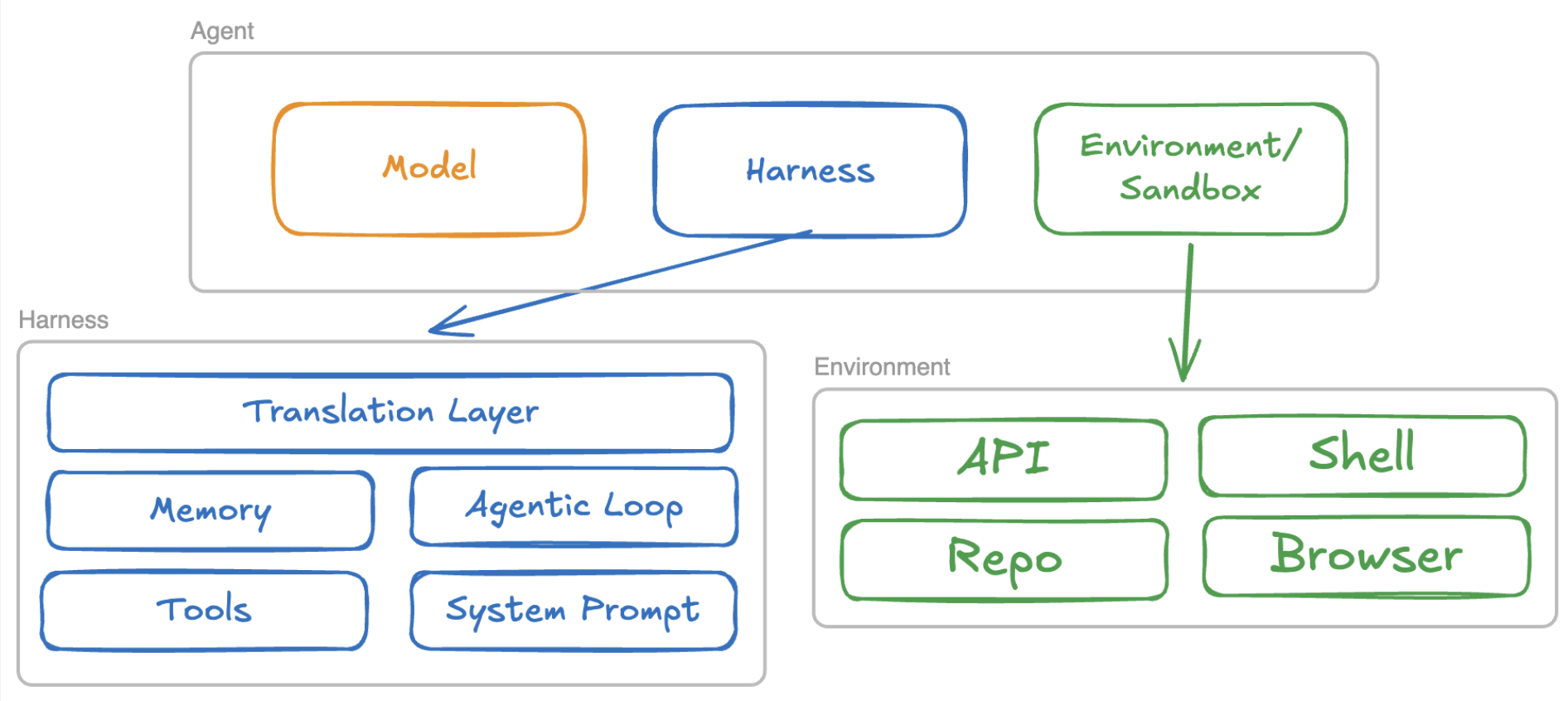
An agent is a model, a harness, and an environment it can act on: a shell, a repository, an API, or a shared workspace. The harness decides what the model sees, what it can do, and when it stops.
The diagram has five core parts. We needed all five. But once the agent became a shared teammate instead of a private coding session, we needed four more: messaging, skills, guardrails, and reflection.
A coding agent is not automatically a teammate
A coding agent usually works inside one developer’s session. The developer carries the context: why a feature matters, what the customer asked for, which trade-offs the team already discussed, and who disagreed with what.
A teammate cannot depend on one person’s memory. Ours worked in Slack, where several people could mention it, reply in threads, contribute opinions, and continue work that somebody else had started. It reported progress in Slack and in an internal dashboard.
That changed the problem. The question was no longer “Can the model write this code?” It was:
- Can it recover the intent behind the task?
- Can it find the team’s previous decisions without reading everything?
- Can it use our operational tools correctly?
- Can it show its work where the team already collaborates?
- Can it act safely on behalf of different people?
Those are harness questions.
The five parts that made it run
1. System prompt
The system prompt defines the model’s behavior for the session. It is useful for broad, stable rules: its role, its boundaries, and what completion means. It is not the right place for every query syntax, team convention, and lesson from an old debugging session.
We learned to keep it closer to first-day instructions than company documentation. A rule should describe behavior the model can obey or violate. Task-specific procedures belong elsewhere.
Example
A generic system prompt for this kind of teammate could begin:
You are an R&D teammate working in a shared environment.
- Never merge a pull request. A human must review and merge it.
- Do not claim a task is complete without evidence from the required checks.
- Ask for approval before an action affects production or external users.
- Keep progress and results in the task's shared thread.
The prompt establishes stable boundaries. It does not explain how to query traces or test a particular repository; those procedures belong in skills.
Build checkpoint
- Write explicit rules rather than an essay about the agent’s personality.
- Put prohibitions and approval requirements before preferences.
- Define what evidence the agent needs before claiming a task is complete.
- Do not use the system prompt as a database for changing team knowledge.
2. Tools
Tools determine what the teammate can actually do. Ours could work with code, internal systems, and our observability environment built around Grafana and OpenTelemetry.
More tools did not make it more capable. Giving it many MCP tools often filled its context with irrelevant descriptions and sent it searching in the wrong places. We paid for those mistakes in latency and tokens.
Tool descriptions also did not prevent every repeated failure. In one case, the teammate kept calling a function with the same bad query parameters. The system prompt was too general to hold the fix, and the tool error disappeared with the session. We had to turn the lesson into durable documentation and a better skill.
Example
For an investigation, the harness might expose a small chain of tools:
query_traces(request_id, time_range)
query_logs(trace_id, service)
launch_coding_session(repository, task)
open_pull_request(branch, title, evidence)
The tools provide access to telemetry and code. They do not teach the model the order in which our team uses them; that is the skill’s job.
Build checkpoint
- Start with the smallest tool set that can complete one real task.
- Give every tool a narrow description and a strict argument schema.
- Test which requests make the model choose the wrong tool.
- Return errors that explain how to correct the call, not only that it failed.
- Measure the tokens spent exposing and calling tools that were never useful.
3. Agentic loop
The core loop is small:
- The model chooses an action.
- The harness executes or rejects it.
- The result goes back into context.
- The model chooses what to do next.
The difficult part is deciding when the loop must stop. “The model said it is done” was not enough for us. A code change was not ready until the required checks had run, and a human still reviewed the PR before it could be merged.
A useful loop names its exit conditions: completed with evidence, waiting for human approval, maximum turns, repeated failure, or a missing capability.
Example
One of our code tasks followed this loop:
Slack request
  -> recover the task and team context
  -> launch a coding session
  -> inspect and edit the repository
  -> run linters, tests, and E2E checks
  -> open a pull request with the evidence
  -> stop and wait for human review
A failed check returned to the coding session as the next observation. Opening the PR was an output of the loop; merging it was never an autonomous step.
4. Translation layer
The translation layer keeps provider details out of the rest of the harness. The loop should not care how a provider represents tool calls, streaming events, stop reasons, or token usage.
This part is less visible than memory or tools, but it protects every other part from becoming an application for one model API. One interface should be what your loop calls; provider-specific adapters belong behind it.
Example
A generic translation layer can normalize every provider response into one shape:
interface ModelResponse {
  text: string;
  toolCalls: ToolCall[];
  stopReason: "done" | "tool_call" | "limit" | "error";
  usage: { inputTokens: number; outputTokens: number };
}
One provider adapter may decode a streamed tool call while another receives it
as one object. The agentic loop sees the same ModelResponse either way. This
is an architectural example, not a detail from our internal system.
5. Memory, which is really context management
Our teammate needed broad company context and specific team context. We kept Slack transcripts, daily summaries, people, and previous sessions. Retrieval combined filesystem search, lexical search, embeddings, and summaries.
The important part was not storing everything. It was selecting the few pieces that belonged in the current task.
Without that selection, the model searched irrelevant places, repeated work, re-explained decisions the team had already made, and consumed far more tokens. With better context management, it could begin with the relevant customer, team, and session history instead of rediscovering them.
This is why I count memory as its own harness component. Persistence is only half of it. The harness must also decide what reaches the model, what is summarized, what is omitted, and how the model can retrieve the rest.
Example
A customer had configured a glossary, but the product initially failed to use the relevant term. Instead of starting from zero, the teammate could retrieve the customer’s configuration, earlier Slack discussion, daily summary, and the previous investigation. It then used that narrow context to investigate why the correct information had not been selected.
The alternative was to inject every customer transcript and every previous session. That would cost more while making the useful evidence harder to find.
Build checkpoint
- Separate company, team, person, and session knowledge.
- Retrieve context for the current task instead of injecting the full history.
- Put a visible limit on every tool result and say when content was truncated.
- Measure context size and cost per turn.
- Treat isolation between teams and users as a security boundary, not a retrieval-quality problem.
I have written more about why context can matter more than model choice.
The four parts that made it a teammate
The five-part anatomy explains a working agent. A shared production system forced us to add four more concerns.
6. Messaging
Slack was not just another input adapter. A channel and a thread had to map to conversations. Different people needed to continue the same task. Progress, questions, and results had to return to the place where the team was already working.
This introduced a problem we have not fully solved: when teammates give conflicting instructions, whose instruction wins? A private coding session can assume one operator. A shared teammate needs an explicit authority model.
Example
One engineer could assign an investigation in a Slack thread, another could add customer context, and a third could continue the task later. The teammate kept its progress and result in that thread while also exposing its active work in our internal dashboard. Shared continuity was the feature; unresolved priority between conflicting instructions was the risk.
7. Skills
A tool says what action is available. A skill explains how our team performs a specific job.
For example, investigating a failure through our logs, metrics, and traces required a sequence of known methods and query conventions. That procedure was too specific for the global system prompt but too important to improvise each time. Skills gave us a place to encode it.
This distinction helped us keep the system prompt general while making specialized work repeatable.
Example
Our observability skill encoded a procedure like this:
Start with the request or chat ID
  -> find its trace
  -> identify failed or slow spans
  -> correlate them with logs and metrics
  -> compare behavior across product versions
  -> produce evidence and a root-cause hypothesis
  -> launch a coding session only when there is enough evidence for a fix
query_traces gave the model access. The skill taught it how our R&D team
conducted the investigation.
8. Guardrails
At first, we underestimated security. That changed after a real incident made the risks concrete: acting with the wrong person’s authority and showing data to an unintended audience. The details are private, but the lesson is not: once a harness serves a team, identity and authorization must travel with every action and every retrieved piece of context.
We also found rules that could not be left to a prompt. The harness checked for requirements such as tests and linters before opening a PR, blocked production SSH access, and enforced task checklists in code.
A system prompt asks the model to behave. A guardrail decides whether an action is allowed even when the model behaves incorrectly.
Example
Before opening a pull request, code checked that the required tests, linters, and task checklist had passed. A production SSH request was blocked. These rules still applied if the model skipped a document or insisted that the work was already complete.
9. Reflection and evaluation
A teammate that repeats the same tool mistake every week is not learning. We reviewed previous sessions, promoted useful lessons into internal files and documentation, and improved the relevant skills.
That process must be deliberate. Automatically writing every observation into long-term memory would preserve noise as easily as knowledge. A proposed lesson needs an owner, evidence, and a decision about whether it belongs to one task, one team, or the whole company.
Example: promoting a lesson
The teammate once repeated the same function call with the same invalid query parameters. Finishing that session was not enough, because the next session would begin without the correction. We turned the failure into a proposed lesson:
When an observability tool rejects a query, do not repeat the identical call.
Read the returned error, identify the invalid parameter, and correct the query
before retrying.
After human review, the lesson was promoted into the internal documentation and the observability skill. The path was explicit:
session failure -> proposed lesson -> human review -> documentation or skill
If we rebuilt the system today, we would invest much more in evaluations. A successful demo tells you that the path worked once. Evaluations tell you whether retrieval, tool selection, authorization, and completion checks keep working as the harness changes.
One task, end to end
Before a customer meeting, the team asked the teammate to investigate product latency: median, average, p90, and maximum latency; usage across the customer’s organization; the kinds of questions users asked; and whether releases had improved performance over time.
The teammate recovered earlier discussion from the team’s shared context, queried logs, metrics, and traces through Grafana and OpenTelemetry, and built a dashboard. During the investigation it also found the root cause of a bug. It later opened a PR with a fix.
The first useful research that previously took days arrived in seconds. A human still validated the behavior in the end-to-end environment and reviewed the code. The harness did not remove the team from the process; it moved the team from searching and assembling information to verifying and deciding.
What we would build differently
The first version grew around one team’s reality. That was useful, but every new team felt like a new company: different repositories, conventions, people, tools, and definitions of done.
I would now separate the system into two layers:
- A generic core for the loop, provider adapters, messaging, authorization, context budgets, and evaluation.
- A team-owned layer for memory, tools, skills, conventions, and approval policies.
I would also add stronger guardrails and team-isolation tests earlier. The unresolved instruction-priority problem deserves a design, not another line in the system prompt.
A harness in another domain
The same anatomy applies outside product R&D. This hypothetical pentest flow shows the boundaries clearly: the human owns the task and approval, the model chooses tools, the harness owns context and control flow, and the sandbox owns the side effects.
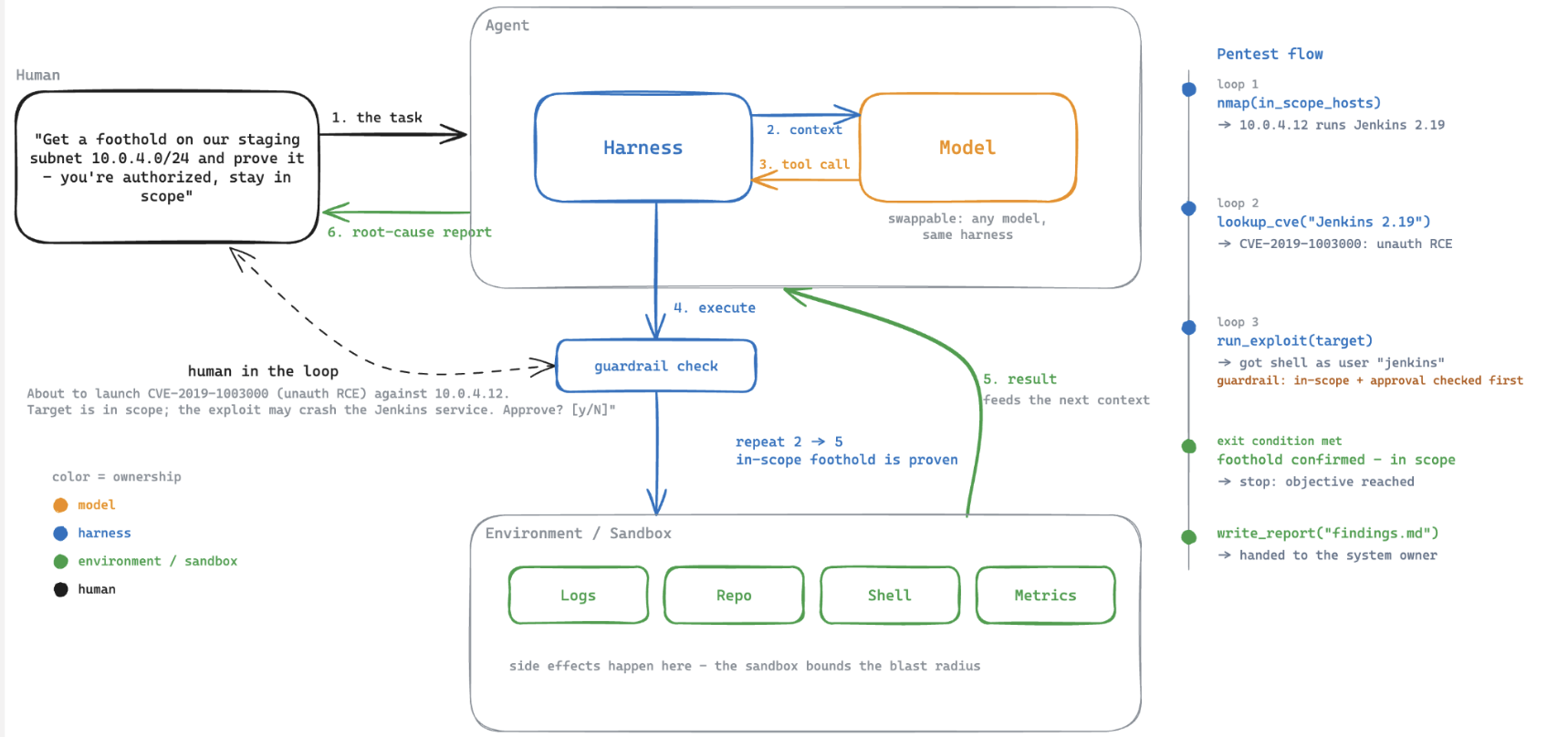
The pentest harness is an example, not the system our team built. What transfers between the two is the set of decisions the harness must own.
Learn from one before you build one
If you already use Claude Code, Codex, pi, or another coding agent, give it a small task and watch the cycle: tool request, execution, result, next action. Then find where its harness implements each responsibility above.
pi is a useful codebase for this because it is small enough to read while still providing an agentic loop and a model translation layer. You do not need to install it to understand this article.
I also maintain github.com/NAVNAV221/harness, a separate Claude Code plugin that helps you design and build your own harness. It is not the internal AI Harness teammate described here. Its repository contains a readable TypeScript skeleton, interviews for defining each component, and reference implementations for memory, guardrails, and reflection.
If you already use Claude Code, its guided setup is:
/plugin marketplace add NAVNAV221/harness
/plugin install harness
/harness:init
If you do not have a harness or coding agent to run those commands, use the repository as source code and the checkpoints in this article as a manual review guide. The article does not depend on the plugin.
Reference
- harness, a plugin for designing your own harness
- What is a harness by earendil, the four-part foundation
- pi, a minimal open source harness
- A smart model doesn’t make up for bad context, why context management matters